In this architectural style, the fundamental elements in the system are events. Events can be signals, user inputs, messages, or a data from other functions or programs. Events act as both indicators of change in the system and as triggers to functions. In this paradigm, functions take the form of event generators and event consumers. Event generators send events and event consumers receive and process these events. A function can be both an event generator and an event consumer. Event consumers are called implicitly based on event sent from event generators.
Event-based functions experience implicit invocation. The defining feature of implicit invocation is that functions are not in direct communication with each other. All communication between them is mediated by an event bus. We can think of the event bus as the connector between of all event generators and consumers in the system.
To achieve this structure, we first bind an event and an event consumer via the event bus. That is, each event consumer registers with the event bus to be notified of certain events. When the event bus detects an event, it distributes the event to all appropriate event consumers. When the event bus detects an event, it distributes the event to all appropriate event consumers. The observer design pattern manifests the event-based architectural style.
One way to implement the event bus is to structure the system to have a main loop that continually listens for events. When an event is detected, the loop calls all the functions bound to that event.
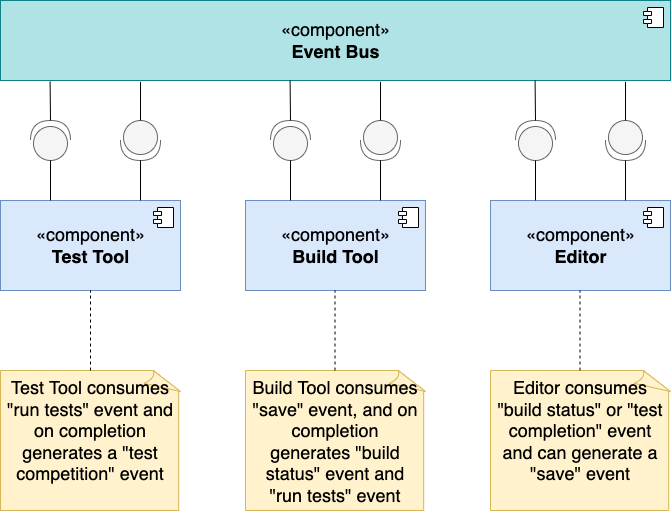
In the event-based architectural style, event generators do not necessarily know which functions will be consuming their events, and likewise, event consumers do not necessarily know who is generating the events they handled. This loose coupling of functions makes it easier to evolve and scale the system. Adding new functionally for an existing event is as simple as registering a new event function pair to the event bus and adding a new event consumer.
let’s consider how objects and data will be updated in the system. If objects in the system are globally accessible then event consumers may change the shared state as they process an event. This design may be risky because event consumers can be called asynchronously. With asynchronous calls, an event consumer does not need to wait for other event consumers to finish running before itself running. This means that two event consumers could be running at the same time on the same shared data.
On the one hand, systems that allow asynchronous function calls may increase the efficiency of the system. But on the other hand, asynchronous calls can result in race conditions. Where the shared data may not be updated correctly.
One way to coordinate function access to shared data is through a semaphore. A simple binary semaphore may consist of a variable that toggles between two values, available and unavailable. Available indicates that the shared data is not in use, and unavailable indicates that the shared data is in use by a function.
A semaphore has a special operation to check and toggle its value in a single step. Any function that would like to access the shared data must first check the value of the semaphore before proceeding. If the value is set to unavailable, then the function must wait and may check back again later. If the value is set to available, it is, at once, toggled to unavailable before the function proceeds to access the shared data. When the function no longer needs access, it will toggle the semaphore value to available to indicate that the shared data is no longer in use. In this way, a semaphore can be used to control access to share data.

The system will use the main event loop to listen for events. When you click the cookie, the function registered to handle this click event is called and the total cookie points is increased by one. When you click the Buy Clicker icon, the function registered to handle this event is the Buy Clicker function. When invoked, it first reduces your cookie score because you have made a purchase.
Then it adds an automatic clicker function to the system, and a new blue cursor is added around the cookie. This means that there will be one automatic clicker function for each blue cursor surrounding the cookie. The first time a clicker is purchased, a timer function is added to the system by the buy clicker function:

The timer function is an event generator registered to the event bus that sends a timer event every five seconds. When the timer function emits a timer event, the event bus detects this and triggers every automatic clicker function to consume this event. Each automatic clicker function is responsible for making one click to the cookie. So every time a timer event is sent to the event bus and received by the automatic clicker functions, the total cookie points increases by the number of automatic clicker functions.


 Ivan's Blog