Last year, I wrote the Sitecore XM to XM Cloud Content Migration article about the brand-new tool from Sitecore that helps to migrate content, media and users to XM Cloud. Now, I would like to share what is new in the just-released XM to XM Cloud Tool v2.1.
Agenda
- Where to get?
- What’s new?
- XMM V1 or V2?
- Updates in GUI.
- What should I know about new configuration?
- Support.
1. Where to get?
Please refer to the Sitecore Developers Portal: https://developers.sitecore.com/downloads/xm-cloud
In the Downloads section you can find the next 2.1.71 version or download directly from here:
| Releases/Options | Description |
|---|---|
| XM to XM Cloud Migration Tool 2.1.71 | Oct 2024 – version 2 initial release. |
2. What’s new?
- Delivers fast data transfers built on Google’s Protocol Buffers (Protobuf) format. That means no SCS under the hood which is simplified installation and decrease complexity of the tool.
- Support migrations from Sitecore XM on-premises and PaaS versions 9.1 and later.
- Simplified and improved UX – less fields, automatic connection checking, etc.
3. XMM V1 or V2?
I highly recommend using V2, as it offers enhanced features and improved performance that can significantly elevate your experience. Don’t hesitate to take advantage of these powerful improvements.
4. Updates in GUI


5. What should I know about new configuration?
The Sitecore XM to XM Cloud Migration Tool transfers content and media via RAIFs (Batches). The settings (appsettings.json) below can be adjusted to better suit transfer needs. The default values have been set to provide a balanced transfer. Most customers will not need to adjust these values.
The ItemsPerRaif define the amount of the transferred items.
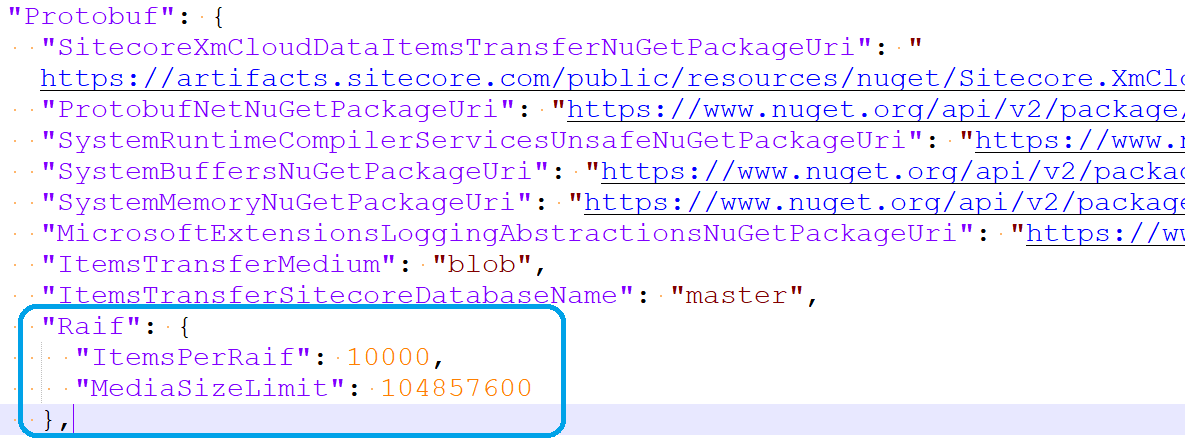
Too low setting of ItemsPerRaif can result in a large number of RAIF files being transferred, where too high of ItemsPerRaif can affect the transfer speed.
Property Name: ItemsPerRaif
Description: The number of items per RAIF file. User can set the value of the ItemsPerRaif property as needed. Assign only an integer values. No decimal or string.
Default Value: 500
Required: Yes
Example: 100 or 1000 or 10000
Property Name: MediaSizeLimit
Description: The media size limit per RAIF. User can set the value of the MediaSizeLimit property as needed. Assign only long value. No decimal or string.
The default value is 104857600 which is 100MB. Example – A RAIF can contain maximum 100MB of media, if a media file exceeds the 100MB, the one media item will be in a single RAIF.
Default Value: 104857600
Required: Yes
Example: 104857600 (for 100MB)
6. Support
If you have any questions, issues or suggestions, please contact the community Slack #xm-cloud channel

 Ivan's Blog