Sitecore has released the new version of Stream for PDXP v.1.7.26.
The release includes:
- The new Tree translation feature (PREMIUM): translate an entire content tree (a parent item and all its descendants) into a target language in a single operation.
- Improved behavior for Page Translation (consistent with Tree Translation): security, optimization, etc.
- Bug fixes: Addressed various minor issues to enhance overall stability and performance.
Stream Tree Translation
The Tree Translation is a new approach for translating your content and media items, serving as a convenient addition to Item Translation and Page Translation. This feature is available for Premium users performing bulk operations.
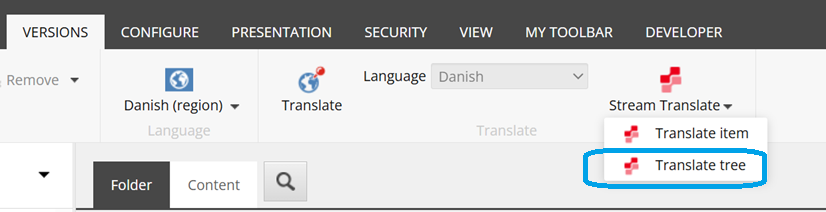
To run the Tree Translation, in Content Editor select the item node that you want to translate, then switch to the target language (e.g. Danish) and in the Versions tab click the Stream Translate => Translate Tree
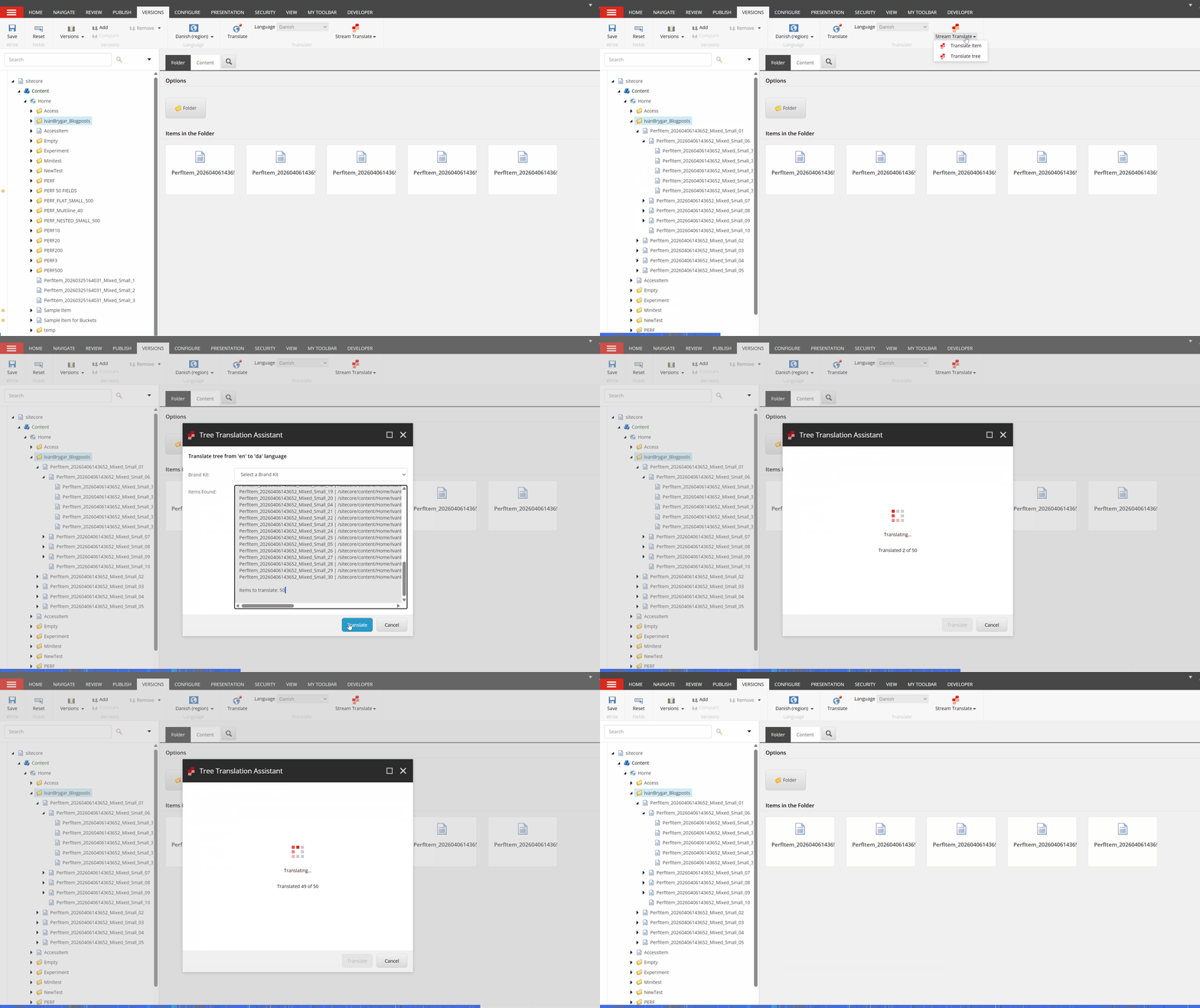
In the next example I show how to use Tree Translation that has 50 items in the selected node.
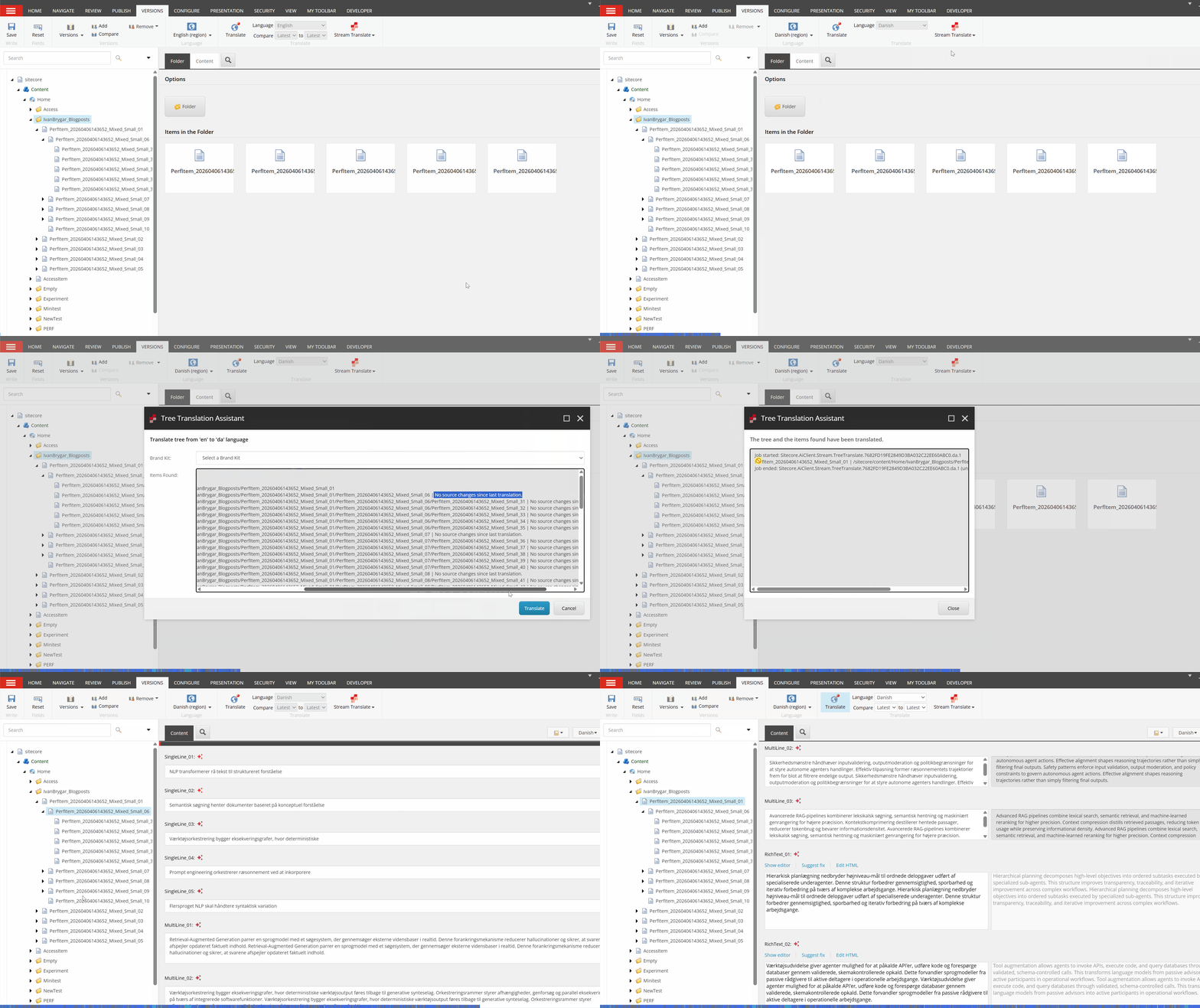
What will happen if a content author modifies an item in the source language (e.g., English) and translates the same tree again? In this case, Sitecore determines only the items that have been modified and translates only the updated item, not everything. The modified item will get the second version while every other item will remain as Version 1.
By default, content authors are allowed to translate up to 200 items via Tree Translate functionality, which should be more than enough. But if for some reason a user would like to translate a large amount of items, it’s recommended to go by chunks. Alternatively, you have the TreeMaxItems setting where you can adjust the amount of items to be translated in one go. The setting is:
<setting name="Sitecore.AiClient.Stream.Translate.TreeMaxItems" value="200" />
With the current design, users can safely translate and re-translate content without worrying about failures during the process. If a translation operation is interrupted – for example, due to a connection issue – the system will resume intelligently the next time. Instead of reprocessing everything, it will translate only the missing items. This approach makes the process clearer, more reliable, and significantly more time-efficient.
What items are considered translation candidates? All items are considered candidates for translation except the following:
- Items without write permissions – Items for which the user does not have write access will be skipped.
- Structural items – Items such as folders are excluded from translation.
- Items without translatable content – Content items that do not contain any values in supported fields, or where those fields are empty.
- Up-to-date items – Items that have already been translated and where the source language content has not changed since the last translation
Important note: In the v.1.7.26, the Page Translation feature follows the same behavior.
Nice to know: If an item node contains more items than the limit (200), this does not necessarily prevent translation. The system counts only translatable items toward the limit. Items that cannot be translated – such as those without write permissions or items with empty supported fields – are excluded from this count. As a result, even if a node contains many non-translatable items (for example, 500), users can still translate the tree as long as the number of actual translation candidates remains within the limit.
Module releases history and related documentation: https://developers.sitecore.com/downloads/Sitecore_Stream_for_Platform_DXP

 Ivan's Blog