Software

SOLID (O) – Open/Closed Principle

Classes should be open for extensions but closed for change.

You should consider a class as being “closed” to editing once it has been:

  • Testing to be functioning properly.
  • All the attributes and behavior are encapsulated.
  • Proved to be stable within your system.

Once you’ve reached a point in development where you’ve already finalized most of your design decisions, and have implemented the most of your system, then you should consider “closing” your classes. It’s needed to avoid introducing undesirable side effects (of course it’s still acceptable to modify the code if need to fix bugs).

Continue reading “SOLID (O) – Open/Closed Principle”
Software

SOLID (D) – Dependency Inversion Principle

Dependency is an important topic, because it will determine how easily you can make changes to your system. The Dependency Inversion principle help to make a system more robust and flexible.

The principle states that high level modules should depend on high level generalizations, and not on low level details. This means that the client classes should depend on an interface or abstract class instead of referencing to concrete resources.

High level resources: interfaces and abstract classes.

Low level resources: concrete class.

Class diagram comparison between the low and high level resources:

Continue reading “SOLID (D) – Dependency Inversion Principle”
Software

SOLID (L) – Liskov Substitution Principle

In simple words: the subclass should be able to substitute a base class when needed and don’t lost sense/don’t change behavior after substitution.

As inheritance allows the subclass to become polymorphic, because inheritance lets the subclass become a subtype of the base class.

Subtyping also allows subclasses to be used as substitutes for their base class. Substitution states that:

Any class, S, can be used to replace a class, B, if and only if, S is a subtype of B.

Substitutability Class Diagram.png

Simply put, any subclass can stand in for its base class. Because of inheritance, a subclass is expected to have the same characteristics and behave in the same way.

The base class is the more generalized class, and therefore, its attributes and behaviors should reflect it. The names given to the attributes and methods, as well as the implementation of each method must be broad enough that all subclasses can use them.

If inheritance is not used correctly, it can lead to a violation of the “Liskov Substitution Principle”. This principle uses substitution to determine whether or not inheritance has been properly used. The Liskov Substitution Principle states that:

If a class, S, is a subtype of a class, B, then S can be used to replace all instances of B without changing the behaviors of a program.

Continue reading “SOLID (L) – Liskov Substitution Principle”
Software

MVC Pattern

The pattern is useful when UI is needed.

MVC Diagram.png

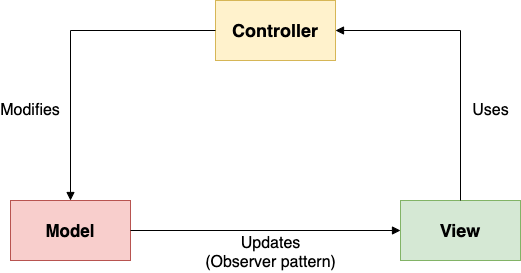
The Model contains the underlying data and logic that users want to see and manipulate. A key part of the MVC pattern that the model is self-contained. It has all of the state, methods and other data that it needs to exist on its own. Model focuses solely on managing the information for the system.

The View gives a user a way to see the model or at least parts of it (with buttons, images and other user interface). Responsible only for visual appearance of the system.

The Controller corresponds with control object that receives the events and coordinate actions.

Software

Observer Pattern

Visualization example: let’s say you want to know about the new articles of this blog. You can make software which will check the updates every 1 minute or every 1 hour or even a day. But maybe you need to know immediately, then the observer pattern can help, where the blog will notify you every time a new post is added. You would subscribe to the blog. Every time when new post is published, the blog will notify each subscriber, including you. Hence you don’t need to pull for this information at some interval.

Subject – blog, will keep the list of Observers (subscribers to the blog).

We’ll have a Subject superclass, that defines three methods:

  • Allow a new observer to subscribe.
  • Allow a current observer to unsubscribe.
  • Notify all observers about a new blog post.
Continue reading “Observer Pattern”
Software

Mediator Pattern

Imagine the next situation, you have the smart home where devices communicate to each other and do one or another action dependent on the state of another device.

No Mediator Visualization Diagram.png

The visualization looks complicated and will be even more complicated if needed additional connections between the devices. To simplify the design, must to implement the Mediator pattern, this is how it should looks:

Continue reading “Mediator Pattern”
Software

Command Pattern

The pattern encapsulates the request as an object of its own. Usually, when one object makes a request for a second object to do an action, the first object will call a method of the second object and the second object would complete the task.

Common way:

No Command Pattern Visualization Diagram.png

Visualization of the Command design pattern:

Command Pattern Visualization Diagram.png

In this way, the Sender doesn’t need to know about the receiver and the methods to call.

The Command pattern has another object that invokes the command object to complete whatever task it is supposed to do, called the invoker.

Continue reading “Command Pattern”
Software

Disable bots detection in Sitecore

There are may be needs for you to test some visits in Sitecore to determine each visit precisely but some of them are not handled because Sitecore may think this is not real interactions, especially if make interactions via JMeter, Locust or K6. To disable bots detection you should follow the next steps:

  1. Open the C:\inetpub\wwwroot\<instance name>\App_Config\Sitecore\Marketing.Tracking\Sitecore.Analytics.Tracking.config
  2. Find two settings:
    • Analytics.AutoDetectBots
    • Analytics.Robots.IgnoreRobots

Set the both values of the settings from true to to false.

<!--  ANALYTICS AUTO DETECT BOTS
            Enable auto detection of bots.
            Default: true
-->
<setting name="Analytics.AutoDetectBots" value="false" />

<!--  ANALYTICS ROBOTS IGNORE ROBOTS
            Ignore requests and do not write information to the Analytics database when the visitor 
            classification identifies the visitor as a robot.
            Default: true
-->
<setting name="Analytics.Robots.IgnoreRobots" value="false" />

Now each visits will be considered as a valid visit and each visit will be tracked.

Software

Chain of Responsibility Pattern

A chain of objects that are responsible for handling requests. Its a series of objects that are linked together.

Chain of Responsibility Visualization Diagram.png

When a client object sends a request, the first handler in the chain will try to process it. If a handler can process the request, the request ends at this handler. If a handler cannot deal with the request, the handler will send a request to the next handler nd so on. If any handler can process it, then the request if not satisfied.

Continue reading “Chain of Responsibility Pattern”