ai · English Article · Software

Sitecore Stream for PDXP – Page Translation, Roles and more improvements in v.1.5.89

Sitecore has released the new version of Stream for PDXP, v1.5.89.

This is a big release that has a brand new feature – Page Translation that automatically discovers and translates a page item along with any Sitecore items it referenced.

Also, Item translation get enhancements – when item translation occurs, fields that are not supported for translation will carry over their values to the new version of the item alongside the translated content.

Now you can assign specific AI roles to your user, where every role corresponds to a specific feature.

Continue reading “Sitecore Stream for PDXP – Page Translation, Roles and more improvements in v.1.5.89”
English Article · Software

Sitecore .webp images support

The .webp media in Sitecore has been supported since version 10.4. But if you need to add support for lower versions, follow the next steps:

  1. Under the master database add webp items under the next pathes (can be cloned from jpeg item and then adjusted):
/sitecore/templates/System/Media/Unversioned/webP
/sitecore/templates/System/Media/Versioned/webP

2. In Sitecore.config a new media type should be added:

<mediaType name="WEBP image" extensions="webp">
    <mimeType>image/webp</mimeType>
	<forceDownload>false</forceDownload>
	<sharedTemplate>system/media/unversioned/webP</sharedTemplate>
	<versionedTemplate>system/media/versioned/webP</versionedTemplate>
	<mediaValidator type="Sitecore.Resources.Media.ImageValidator" />
	<thumbnails>
	    <generator type="Sitecore.Resources.Media.ImageThumbnailGenerator, Sitecore.Kernel">
	        <extension>png</extension>
	    </generator>
	    <width>150</width>
	    <height>150</height>
	    <backgroundColor>#FFFFFF</backgroundColor>
	</thumbnails>
	<prototypes>
	    <media type="Sitecore.Resources.Media.ImageMedia, Sitecore.Kernel" />
	</prototypes>
</mediaType>
English Article · Software

Sitecore Stream for PDXP – Content Extraction

In the new release, Sitecore introduced a brand-new feature – Content Extraction that can help extract data from various input sources, including files, URLs, or plain text. The latest package is version 1.3.23.

In my demo I’ll have 2 parts: preparation and execution.

Preparation

Let’s say we have a store of Powerful bars/gels, there can be lots of different products with different flavors, usage, package sizes, and so on. Hence for this kind of items (products) a template is needed:

Then we need a document, as for now it’s supported the next file formats: PDF, TXT, JPG, JPEG, PNG.

As an example, please refer to the following screenshot; in my case, it’s a PDF document. In real life, you might have a multipage document, but just be aware that the limit is 3MB and the maximum number of pages should be up to 30.

Continue reading “Sitecore Stream for PDXP – Content Extraction”
English Article · Software

Sitecore Stream for PDXP April Update 2025 – Brand Kits and Multiple Content Variants

The new version of the Stream for PDXP has two exciting new features:

  1. Brand Kits – user can generate content in context of a selected Brand.
  2. Multiple Content Variants – users can select the number of variants to be generated in one request.
Continue reading “Sitecore Stream for PDXP April Update 2025 – Brand Kits and Multiple Content Variants”
English Article · Software

Sitecore Stream for Platform DXP March Update 2025

Last month Sitecore released the Sitecore Stream for PDXP, and today the new update is available and it’s highly recommended for update because it simplifies installation and brings various bug fixes and UX improvements. Follow the official documentation to learn more.

The release including:

  • Bug Fixes: addressed minor issues to enhance overall stability and performance.

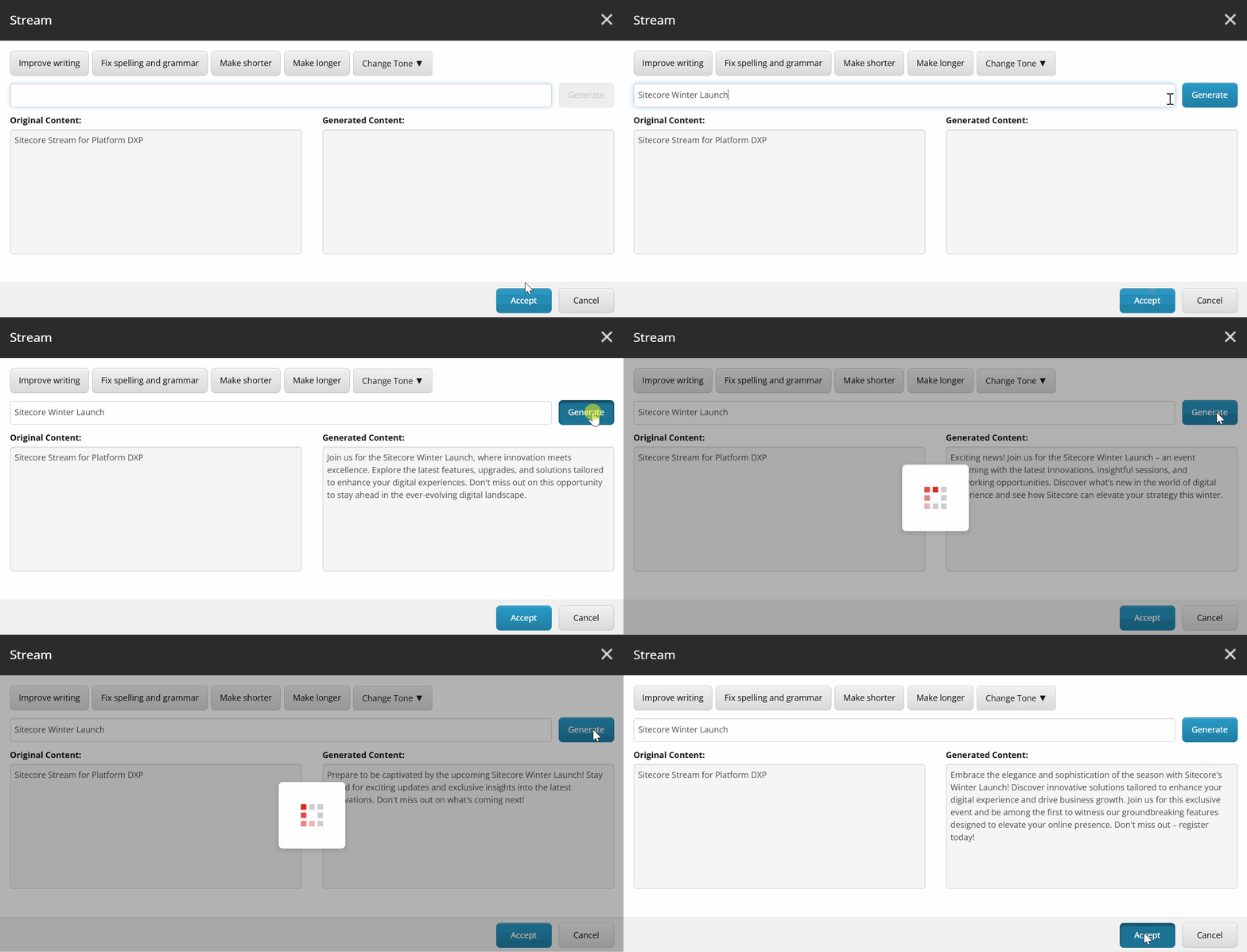
You can use prompts to work with the original content, for example, ask to remove tags, translate, or anything else.

Continue reading “Sitecore Stream for Platform DXP March Update 2025”
English Article · Software

Sitecore XM to XM Cloud Content Migration

Agenda:

  1. Introduction
  2. What does this tool do?
  3. What does the tool look like?
  4. What ZIP file contain?
  5. Prerequisites
  6. Sitecore XM Migration GUI
  7. Sitecore XM Migration Console

Sitecore has lots of customers who developed their solution based on classic Sitecore OnPrem which exists in the market for 2 decades. Also, Sitecore released the XM Cloud, a fully SaaS solution in July 2022.

Lots of customers continue to use the OnPrem solutions, new customers prefer to use the SaaS version and of course, some would like to switch to it, but it requires lots of effort. Sitecore just released to the public a brand-new XM to XM Cloud Content Migration tool that assists in minimizing the account’s barriers to migrating to Composable DXP.

What does this tool do?

It helps migrate customers’ data from the source of the XM OnPrem instance to the XM Cloud account. It migrates the content, media, and internal users (but not custom site data at this moment).

Continue reading “Sitecore XM to XM Cloud Content Migration”
English Article · Software

Security in Sitecore Order Cloud and Access Token

The Sitecore Order Cloud is a rich and mature e-commerce engine.

It has a few must-know security related definitions:

  1. Security Profiles– a custom scope of the roles which can be assigned to the different levels: user, user group, buyer, seller, or supplier level.
  2. Roles – this is data access, which can be granularly assigned, for example, BuyerReader, BuyerAdmin, OrderAdmin, etc.:
The API Roles in Sitecore Order Cloud
Continue reading “Security in Sitecore Order Cloud and Access Token”
Software

Disable bots detection in Sitecore

There are may be needs for you to test some visits in Sitecore to determine each visit precisely but some of them are not handled because Sitecore may think this is not real interactions, especially if make interactions via JMeter, Locust or K6. To disable bots detection you should follow the next steps:

  1. Open the C:\inetpub\wwwroot\<instance name>\App_Config\Sitecore\Marketing.Tracking\Sitecore.Analytics.Tracking.config
  2. Find two settings:
    • Analytics.AutoDetectBots
    • Analytics.Robots.IgnoreRobots

Set the both values of the settings from true to to false.

<!--  ANALYTICS AUTO DETECT BOTS
            Enable auto detection of bots.
            Default: true
-->
<setting name="Analytics.AutoDetectBots" value="false" />

<!--  ANALYTICS ROBOTS IGNORE ROBOTS
            Ignore requests and do not write information to the Analytics database when the visitor 
            classification identifies the visitor as a robot.
            Default: true
-->
<setting name="Analytics.Robots.IgnoreRobots" value="false" />

Now each visits will be considered as a valid visit and each visit will be tracked.