Software

Coupling and Cohesion

Coupling and cohesion are metrics to evaluate design complexity.

These metrics helps to achieve a more manageable system.

Coupling

Coupling focuses on complexity between a module and other modules. If your module is highly reliant on other modules, then this module is tightly coupled to others (puzzle). If your module finds it easy to connect to other modules, this module is loosely coupled to others (Lego).

Coupling.png
Coupling

When evaluating the coupling of a module, you need to consider degree, ease and flexibility.

Continue reading “Coupling and Cohesion” →
Software

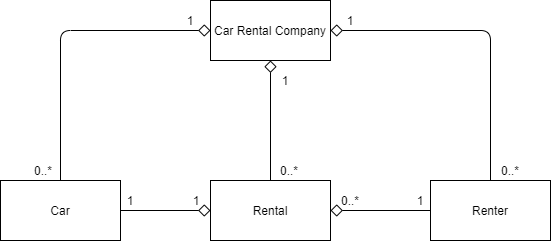
UML Class Diagram of a car rental company

Car Rental Company UML class diagram.png

This example has the next 4 entities:

  1. Car Rental Company: company itself, which is the “whole“.
  2. Car: cars owned by the company.
  3. Rental: rental entity (like contract), which is the “whole” for Car and Renter entities.
  4. Renter: a person who rent car.

All of the connections are composition. The system has the next generalization connections:

  • Car Rental Company – Car: the company can have 0 or many cars; a car can have only 1 company.
  • Car Rental Company – Rental: the company can have 0 or many rentals; a renal can have only 1 company.
  • Car Rental Company – Renter: the company can have 0 or many renters; a renter assigned only o 1 company.
  • Rental – Car: 1 rental can be assigned to 1 car and vise versa.
  • Rental – Renter: each rental can have only 1 renter but a renter can have 0 or many rental.

Software

Software Quality Attributes

The attributes in the article are technical capabilities that should be used in order to fulfill the non-functional requirements, so the most important and common quality attributes are:

  1. Scalability.
  2. Manageability.
  3. Modularity.
  4. Extensibility.
  5. Testability.

In reality there are much more quality attributes: wikipedia.

Intro illities.png

Scalability

Adding computing resources without any interruption.

Non-Scalable System, which obviously require a lot of efforts to fix it:

  1. Look for non-scalable code.
  2. Rewrite non-scalable code.
  3. Reinforce VM.

Scalable System:

  1. Add VM.
  2. Notify the Load Balancer.

There are 2 types of scalability: scale up (vertical) and scale out (horizontal).

ScaleUpScaleDown.png

The preferable option is Scale Out which has 2 main benefits:

Continue reading “Software Quality Attributes” →
English Article · Software

Locust as a modern load testing framework

The Locust is an alternate tool to the JMeter. Locust allow you to write load tests in python, this tutorial describes how from scratch make a simple load testing and see results. Let’s do the following steps:

  1. Install python on your system.
  2. Install Pip (package manager).
  3. Install Locust: pip install locust.
  4. Simple locust script.
  5. Run script: you can already execute the loadttesting.sh and see the next console window:
The console window after the run loadtesting.sh window.

Please pay attention to the output url: http://0.0.0.0:8089, please adjust the address to the next: http://localhost:8089, (as the IP-format may not work) and paste to the browser, you should see the next:

Continue reading “Locust as a modern load testing framework” →
English Article · Software

How to get and put files under Kubernetes pod

1. Copy a file from the App_Data/logs/ path of the default/cm-5c57dbd5d5-pqwh9 pod into the local C:/myf/log.txt file:

kubectl cp default/cm-5c57dbd5d5-pqwh9:App_Data/logs/log.20201215.092051.txt /myf/log.txt

2. Copy the Sitecore.ContentTesting.dll file from the local machine into the pod with path bin/Sitecore.ContentTesting.dll

kubectl cp C:\Work\Solutions\CT\code\Sitecore.ContentTesting\bin\Debug\Sitecore.ContentTesting.dll  default/cm-5c57dbd5d5-pqwh9:.\bin\Sitecore.ContentTesting.dll

3. Copy all the files from the App_Data/logs/ path into the local C:/myf/:

kubectl cp default/cm-5c57dbd5d5-pqwh9:App_Data/logs/ /myf/

Note for the #3: please check that all the files are copied, in my case some of them were missed somehow, if you know why it may happens please let me know, thank you in advance!

English Article · Software

Netlify Split Testing

The Netlify service allows you not only to deploy Jamstack apps, but also do split testing, meaning that can show to users different variations of the same page. The approach they provide is quite interesting and different from common software practices. I would say it’s even more related to configuration.

Let’s say we have simple JAMstack website. To use the split-testing approach we should have the source code in Bitbucket, Github or Gitlab. Make sure your latest changes is in the master branch.

Then login to the Netlify account, go to the Team overview tab and click the New site from Git.

Then do 3 simple steps which take less than a minute and you should have connected repository to the Netlify.

Continue reading “Netlify Split Testing” →